
FBA & operations · 11 minute read
How to send products to Amazon FBA in the UK: Send to Amazon, step by step
Getting stock into Amazon is a process with a price per unit at every step: how you pack, what you tell Amazon about each box, which carrier you book and where the stock is sent. Here is the UK workflow as it stands in October 2026, with the choices that make it cheaper and the mistakes that make it slow.

By Robert Prime
CEO and co-founder

Reviewed by Atouka Tsochataridis
Growth Director
- Published
- Last reviewed
- Sources
- 16 primary and labelled
Cover designed for Mr. Prime.
The short answer
Key takeaways
- Send to Amazon has six steps: choose inventory, pack, confirm shipping, print box labels, then pallet details and labels or tracking, depending on how you ship.
- Give box content information for every box. If you skip it, Amazon charges £0.15 a unit in the UK, applies it to every unit in the shipment if any box is missing, and limits you to pallet freight.
- The Amazon Partnered Carrier programme runs in the UK for parcels (UPS, DHL, DPD) and pallets (RXO, Kuehne+Nagel), with rates shown and paid in Seller Central.
- Treat inbound as a cost per unit: freight, box contents, placement and the days stock spends in transit all change what each unit costs you to sell.
- Overweight boxes, wrong quantities and missing labels are the problems that get future shipments blocked. Weigh, count and label every box.
By the numbers
- £0.15
- Manual processing fee per unit in the UK when you do not provide box content information
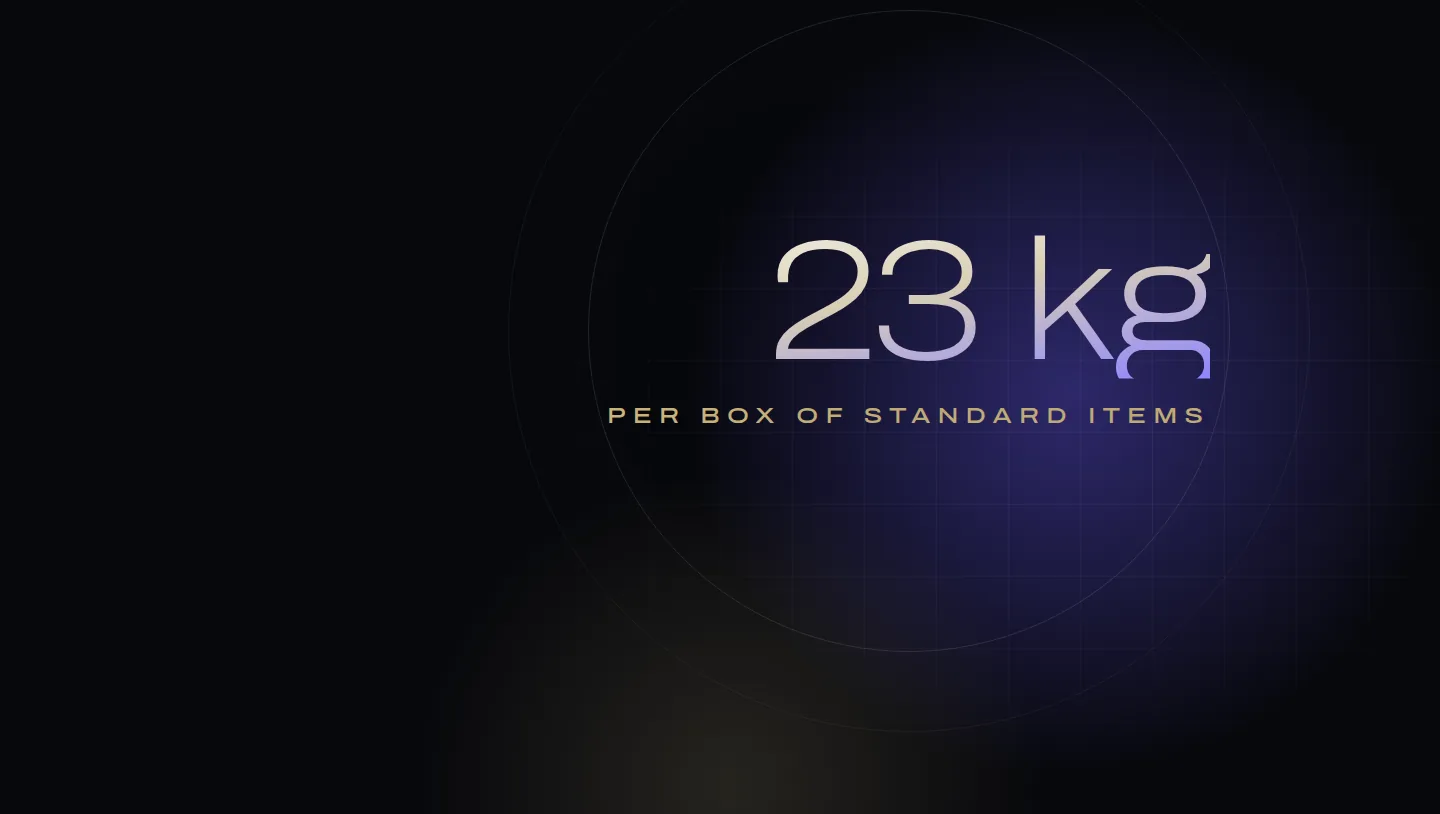
- 23 kg
- Maximum weight of a box of standard-size items; boxes over 15 kg need heavy-parcel labels on five faces
- 72 hours
- How long Send to Amazon holds the fulfilment centre placement before you must confirm
- £0.12
- Freight per unit for 1,200 units on two partnered pallets in our worked example (illustration)
From Robert Prime and the Mr. Prime team, who plan and book inbound shipments and replenishment for founder-led UK and European brands selling through FBA.
Every unit you sell through Amazon FBA has to get to Amazon first, and that journey has a cost most brands never measure per unit: freight, the fee for any information you do not give Amazon, and the days the stock spends in a lorry or a receiving queue instead of on sale. This guide walks through the UK Send to Amazon workflow as it stands on 1 October 2026, and the choices inside it that change that cost. It assumes your units are already prepped and labelled; if not, start with our FBA prep guide.
Before you create a shipment
Three things decide whether the shipment goes smoothly, and all of them happen before you open the workflow.
- The products are converted to FBA. Send to Amazon only lists SKUs that already use FBA; it cannot convert them1.
- The units are prepped and labelled. Amazon stopped prepping and labelling for sellers in its European stores on 1 July 2026, so whatever arrives is received as it is. Our prep guide covers the rules.
- You have capacity. UK capacity limits are set monthly in cubic feet per storage type, and open shipments count towards them. If stock at Amazon plus stock on the way would exceed your limit, you cannot create the shipment11. New Professional accounts that have used FBA for less than 39 weeks have no limit; Individual accounts have a fixed 15 cubic feet11.
Send to Amazon, step by step
Send to Amazon is Amazon’s streamlined shipment creation workflow. You open it from the Shipping Queue1, and the steps run in this order:
Creating an FBA shipment in Send to Amazon
- Choose inventory to sendSelect the FBA SKUs and quantities. Set each SKU’s prep category and who preps and labels it, which is now you. Save case pack templates for SKUs you always pack the same way.
- Pack individual unitsChoose how you will pack and tell Amazon what is in each box: one box, several boxes with box contents, several boxes with 2D barcodes, or several boxes without box contents for a fee. Enter every box’s weight and dimensions.
- Confirm shippingReview the fulfilment centres Amazon assigns, set the ship date, choose small parcel or pallets and a carrier, and accept the estimated charges.
- Print box labelsPrint a unique FBA box ID label for every box, and the partnered carrier labels if you bought them in the workflow.
- Confirm carrier and pallet informationPallet shipments only: pallet count, weights and dimensions, and the collection booking.
- Print pallet labelsPallets with an Amazon partnered carrier: one label on each of the four sides of every pallet.
- Add tracking and the delivery windowNon-partnered carriers only: enter tracking numbers and a seven-day delivery window.
- Follow it to ClosedTrack it in the Shipping Queue through In transit, Delivered, Checked-in, Receiving and Closed, then reconcile what was received.
Steps four to six apply only to some shipments: pallet details for pallets, pallet labels for partnered pallets, tracking for non-partnered carriers1. A few rules inside the steps catch people out:
- Packing data must be close to reality. The box weight and volume you enter must not be more than 10% below the combined weight and volume of the units inside3.
- Placements expire. Fulfilment centre placement options are valid for 72 hours pending confirmation, and the shipping details can change if you do not confirm within 24 hours2.
- Choose the mode carefully. Once you confirm the shipping mode and ship-from address you cannot change them. A shipment sent by a different mode can be refused at collection or cause problems at the delivery appointment2.
- After confirming, you cannot add new SKUs, and quantity changes are only allowed within limits; beyond them, you cancel and start again2.
- Delivery window. With a non-partnered carrier you give a seven-day delivery window: at step 2 for small parcels and step 4 for pallets. You can update it until the window starts10.
Box content information
Box content information is the number of units of each SKU in each box, any expiry dates, and each box’s weight and dimensions. Amazon requires it for every box, even a box holding a single SKU4. You can give it by web form, by uploading an Excel or tab-delimited file, with a 2D barcode on each box, or through the Selling Partner API4.
If you skip it, Amazon processes the boxes by hand and charges a manual processing fee of £0.15 a unit in the UK5. Three details make it expensive:
- If any box in the shipment lacks the information, the fee applies to every unit in that shipment4.
- Shipments created without box contents can only travel as pallet freight, and you can only add the information later by Excel upload2.
- Manually processed shipments may be received more slowly5.
On a shipment of 2,400 units, skipping box contents costs £360. Two rules apply whatever you choose: each box may contain units from only one shipment ID, and what you send must match the plan, including SKUs, barcodes, expiry dates, condition, quantities and packing type6.
Box and pallet rules
| Rule | UK requirement |
|---|---|
| Box size, standard-size items | At least 15.2 × 10.0 × 2.5 cm; no side over 63.5 cm |
| Box weight | 0.15 kg to 23 kg; a box with a single oversize unit up to 30 kg |
| Heavy boxes | Over 15 kg: a “Heavy parcel” or “Team lift” label on the top and sides, five in total, which you print yourself |
| Box type | Rigid, six-sided, flaps intact; no stretch wrap, straps, staples or packing peanuts |
| Pallets | 1000 × 1200 mm or 800 × 1200 mm four-way wooden pallets; up to 1.8 m high and 500 kg; wrapped in clear film |
| Box labels | A unique FBA box ID label on every box, clear of seams |
All of these come from Amazon’s shipping and routing requirements6, except label placement, which is on the small parcel page: keep labels off seams and, where possible, at least 3 cm from the box’s edges7. Pallets shipped internationally must be heat-treated to ISPM-15, and pallet deliveries need a vehicle of at least 7.5 tonnes that can reverse to a loading bay6. Amazon strictly enforces box weights and dimensions; overweight boxes can lead to fees, refusal or blocked future shipments6.
Carrier options in the UK
The Amazon Partnered Carrier programme is available in the UK. It covers small parcel deliveries through UPS, DHL and Geopost (DPD UK), and pallet deliveries through RXO and Kuehne+Nagel. You see the rate in Seller Central, pay for it there, print labels and track deliveries, and schedule pallet collections8. To qualify, your warehouse must be in the UK or one of the listed EU countries, the shipment must go to a fulfilment centre in an eligible country, and it must not contain dangerous goods8.
Amazon’s own example gives a sense of the price: one 18 kg box from Cheltenham to its MAN4 fulfilment centre near Chesterfield cost £7.58 through the programme8. Rates depend on the collection point, destination and number of boxes or pallets, so check yours in the workflow. You can void partnered charges within 24 hours for small parcels and within 1 hour for pallets2.
Your own carrier works too, with conditions: only professional carriers may deliver, private vehicles are not allowed, and parcels cannot be handed in at reception6. Carriers must provide proof of handover with a timestamp and the name or signature of an Amazon employee7. One workflow cannot mix partnered and non-partnered carriers2.
From outside the UK, the Amazon SEND programme carries FBA stock by air or sea from the USA and China to UK fulfilment centres, with the carrier handling customs clearance15. For brands that hold stock in bulk, Amazon Warehousing and Distribution (AWD) has a UK facility for the UK store, which stores stock long-term and replenishes FBA based on demand; you need a UK VAT registration to use it14.
Placement and capacity: a cost-per-unit decision
Inbound cost is easiest to judge per unit. Here is one shipment of 1,200 units, packed 30 to a box, compared four ways. Amazon’s £0.15 manual processing fee is real5; the freight rates are illustrative.
Pallets win on freight here, and giving box contents halves the cost of the pallet option. But freight is only one part of the cost per unit. The rest is placement, capacity and time.
Placement. By default your stock may be routed to more than one fulfilment centre, chosen from what you ship and where from2. For eligible shipments, the UK’s box-level inventory placement splits the boxes into groups for different destinations at no additional cost, and for partnered shipments Amazon says there is no impact on your carrier costs9. We could not find an inbound placement service fee in Seller Central UK’s help on 1 October 2026; the one in Amazon’s US help, which charges for choosing fewer destinations, does not appear on the UK site. Any placement charge would show at Confirm shipping, so check the charges there before you accept. With your own haulier, more destinations can mean more deliveries, so price each split before confirming, and look at merging shipments where Send to Amazon offers it2.
Capacity. Because open shipments count against your limit11, a large shipment booked early can block a more urgent one later in the month. Capacity Manager lets you bid a reservation fee for more space, with no upfront payment, and earns a £0.15 credit for every £1 of sales made using it11.
Time. Stock in transit is cash you cannot sell. Slow receiving, from missing box contents, prep problems or a delivery outside the window, costs you the margin on every sale you miss while the product is out of stock. Our inventory management playbook shows how to build that lead time into reorder points, and our FBA fees guide and FBA calculator put inbound cost into the full cost per unit.
Common problems and rejections
Amazon records receiving problems on your Inbound Performance report: tracking, labels, prep, quantities, safety, damage, expiry, listing problems, restricted items and transport13. Repeated problems raise your coaching level for that problem group12. These are the ones we see cost the most:
| Problem | What Amazon can do | How to avoid it |
|---|---|---|
| Box over 23 kg or 63.5 cm, without a single oversize unit | Treated as a safety problem, with an acceptable rate of zero; repeats can block new shipments for 24 to 120 hours | Weigh and measure every box; heavy labels over 15 kg |
| Wrong box count, wrong quantities or unexpected items | Quantity problem; at Critical, shipment creation suspended for 24 to 120 hours | Count each box as you pack; one shipment ID per box |
| Missing or unscannable box ID label | You must acknowledge help content before your next shipment | Print from the workflow at 100% scale; keep labels off seams |
| Missing product barcodes or prep | Unplanned fees, slower receiving, coaching | Follow the prep guide |
| Expired or short-dated units | Expired units disposed of, not returned | Check shelf life before booking freight |
| Unacceptable pallet condition | Safety problem, as for boxes | UK pallet spec, clear film, 1.8 m maximum |
| Shipped by a different mode than booked | Refused at collection or appointment problems | Choose the mode you will really use |
The coaching actions are from Amazon’s performance coaching page12, the box rules from its routing requirements6 and the shipping-mode warning from the Confirm shipping page2. One more to avoid: do not send stock against a shipment that is already Closed. Amazon warns that it may not be received properly and can lead to overage charges16. Create a new shipment instead.
After the shipment arrives
Amazon says stock is generally scanned and available for sale within a few working days of arrival16. When the shipment reaches Closed, compare what was received with what you sent, box by box. Our practice is to check every shipment within a week of closing. That is when discrepancies are easiest to evidence, and Amazon’s window for disputing an unplanned service fee is short (our prep guide has the details). Shipments sent with the Partnered Carrier programme are covered by Amazon’s FBA lost and damaged inventory reimbursement policy8, and our guide to FBA reimbursements covers how to claim.
Then feed what you learned into the next shipment: actual receiving time into your lead time, any problems into your packing checklist, and the real cost per unit into your margins. The Profit X-Ray shows what is left per product once all of it is counted.
Frequently asked questions
How do I send products to Amazon FBA in the UK?
How long does Amazon take to receive an FBA shipment?
Is there an inbound placement fee in the UK?
Can I deliver stock to an Amazon warehouse myself?
What happens if I don't provide box content information?
Can I cancel an FBA shipment?
Sources
- Create shipments with Send to Amazon. Amazon Seller Central UK. Checked 1 October 2026.
- Send to Amazon: Confirm shipping. Amazon Seller Central UK. Checked 1 October 2026.
- Send to Amazon: Pack individual units. Amazon Seller Central UK. Checked 1 October 2026.
- Box content information for FBA shipments to Amazon. Amazon Seller Central UK. Checked 1 October 2026.
- FBA manual processing fee. Amazon Seller Central UK. Checked 1 October 2026.
- Shipping and routing requirements. Amazon Seller Central UK. Checked 1 October 2026.
- Small-parcel delivery to Amazon. Amazon Seller Central UK. Checked 1 October 2026.
- Amazon Partnered Carrier programme overview. Amazon Seller Central UK. Checked 1 October 2026.
- Box-level inventory placement. Amazon Seller Central UK. Checked 1 October 2026.
- Send to Amazon: Delivery window, with standard calendar weeks. Amazon Seller Central UK. Checked 1 October 2026.
- FBA capacity limits. Amazon Seller Central UK. Checked 1 October 2026.
- Performance coaching. Amazon Seller Central UK. Checked 1 October 2026.
- Inbound problem summary. Amazon Seller Central UK. Checked 1 October 2026.
- Amazon Warehousing and Distribution (AWD) Europe. Amazon Seller Central UK. Checked 1 October 2026.
- Amazon SEND programme. Amazon Seller Central UK. Checked 1 October 2026.
- Amazon FBA: Packed, shipped, delivered (FAQ on shipment statuses). Amazon Sell UK. Checked 1 October 2026.
How this guide was made
Written by Robert Prime and reviewed by Atouka Tsochataridis, who plan inbound shipments and replenishment for founder-led brands at Mr. Prime. We used AI tools to help research and draft it; Robert edited it and takes responsibility for it. Every rule, limit and fee was checked against the Amazon page listed above on 1 October 2026. Where we give our own practice or opinion, we say so, and the cost examples are illustrations.
Every figure above links to the primary source it came from, and we recheck them when Amazon changes its fees or definitions. Read our editorial standards. Spotted something wrong? Tell us through our contact page and we will correct it and note the change here.
About the author
Robert Prime
Robert has spent more than two decades building, growing and selling online businesses, including an Amazon brand he built and sold for seven figures.
His other exits include Telematics.com, sold to LexisNexis, and Remortgage.com. He co-owned UpDownDesk.com.au, growing it on Shopify alone from £12k to £350k a month before he exited, one of more than six Shopify businesses he has built and sold.
He sets and reviews the strategy for every Mr. Prime client, with the view of an operator who has sat on your side of the table.
Reviewed by
Atouka Tsochataridis
A former officer who overdelivers every time. Runs growth across the client book and is on WhatsApp with clients at all hours.
Your numbers, not ours
See your own break-even, TACoS and profit after ads.
The Profit X-Ray works it out from four monthly figures, or from your Business Report, in your browser.