
Fees & profit · 13 minute read
Raising your prices on Amazon without losing the sale
Costs went up, so the price has to. The risk is not the rise itself but what happens next: fewer shoppers buy, or Amazon stops featuring your offer. Here is the sum that tells you how many sales a rise can afford to lose, the Amazon checks to run first, and how to rise in steps with a rule for when to stop.

By Robert Prime, CEO and co-founder
Reviewed by Stephen Harrison, Account Director
- Published
- Last reviewed
- Sources
- 9 primary and labelled
Cover designed for Mr. Prime.
The short answer
Key takeaways
- Do the sum first. Maximum unit drop = (new unit profit − old unit profit) ÷ new unit profit, using profit after VAT and Amazon’s fees on both sides.
- Each extra £1 on the price keeps only about 68p after 20% VAT and a 15% referral fee with the 2% digital services fee. A £1.50 cost rise needs about £2.20 on the shelf price to stand still.
- Raise your own website and other retailers first. Amazon may not feature an offer priced above the competitive external price, or significantly above recent prices on Amazon or elsewhere.
- Rise in steps and set the stop rule before you start: a floor for unit session percentage and a Featured Offer percentage you will not go below.
- A multipack or new size is not a way round Amazon’s price checks: it compares per-unit prices and products customers consider equivalent.
By the numbers
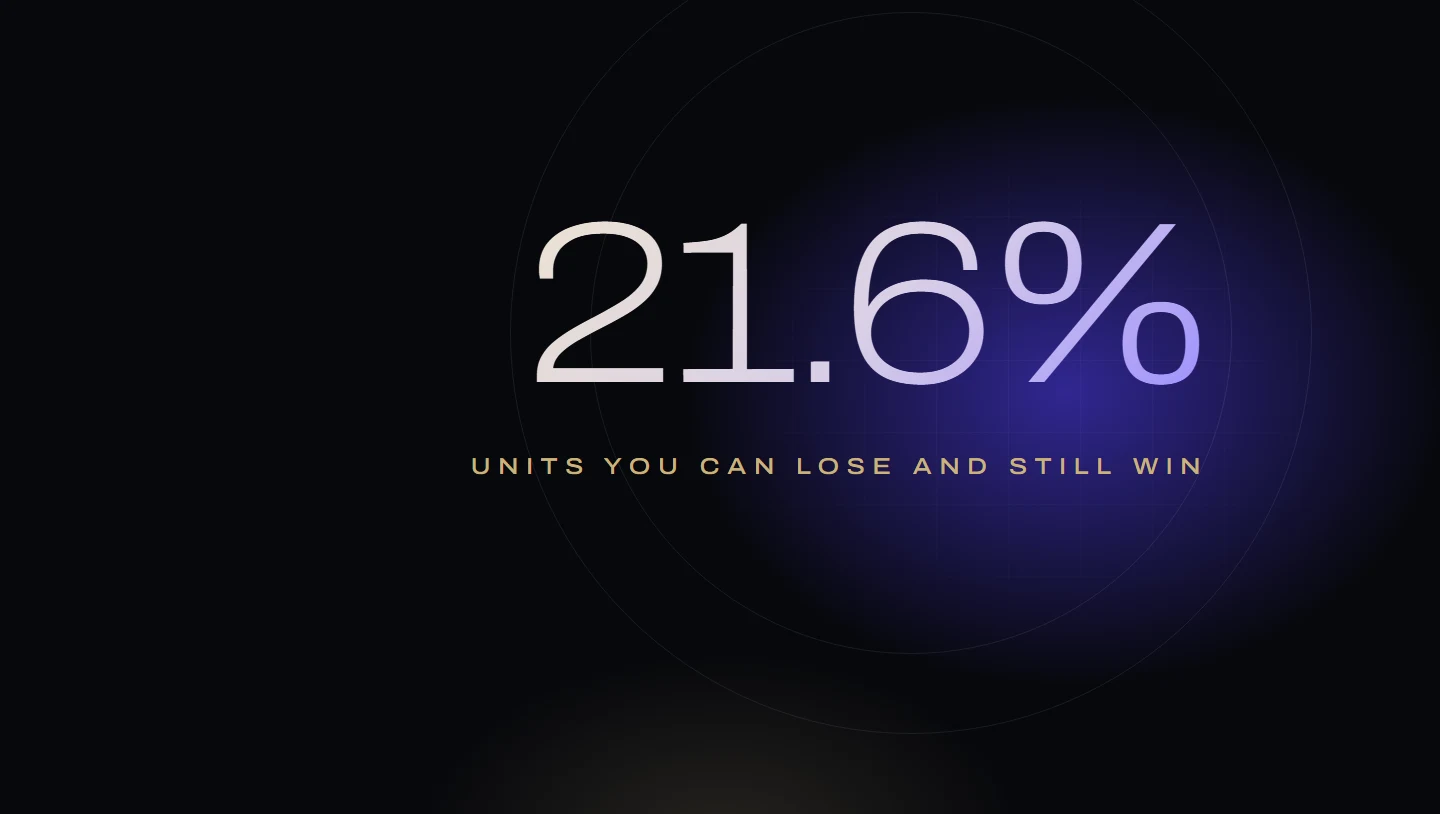
- 21.6%
- Units a 10% rise could lose and still beat absorbing the cost (worked example)
- 68p
- Kept from each extra £1 of price after 20% VAT, 15% referral fee and 2% digital services fee (worked example)
- 60 days
- Window Amazon uses for the average selling price, one of its Pricing Health reference prices
- 7
- Reference prices Amazon lists in Pricing Health, from the Featured Offer price to the was price
From Robert Prime and the Mr. Prime team, who manage Amazon advertising for founder-led UK and European brands: £2.5m of ad spend across our client accounts in the last 12 months. We have seen a margin-protecting price rise halve a best-seller’s conversion.
Your supplier has put prices up, freight costs more, and the margin on your best product is thinner every month. The price has to rise. Most advice on how to do it comes from seller-forum threads and US repricer blogs, and it skips the two things that decide whether the rise works: the sum, and Amazon’s own price checks.
A price rise can fail in two ways. Shoppers can buy less, so you sell fewer units at a better margin and end up with less profit. Or Amazon can stop featuring your offer, so the Add to Basket button goes to someone else or disappears. This guide deals with both, in the order we would deal with them.
Before, during and after a price rise
- Do the sumWork out how many units the new price can afford to lose.
- Check outside AmazonYour own website and other retailers go up first.
- Check Pricing HealthSee which reference prices Amazon will compare you with.
- Rise in stepsSmall steps, each held long enough to measure.
- Stop on the ruleUnit session percentage and Featured Offer percentage, set in advance.
Do the sum before you touch the price
A price rise wins if the extra profit on every unit you still sell is worth more than the profit on the units you lose. That gives a single number to work out before you change anything: the largest fall in units the new price can absorb.
How many units a price rise can afford to lose
Maximum unit drop = (new unit profit − old unit profit) ÷ new unit profit
Use profit per unit after VAT, Amazon’s fees and the product cost, before advertising, at the old price and at the new price. If units fall by less than this, the rise makes more profit.
“Old unit profit” means what you would keep if you did not raise the price, after the cost increase. That is the real alternative. Comparing against last year’s margin makes the rise look worse than it is: in the example below it gives 5.7% instead of 21.6%. If your costs haven’t changed, the two are the same.
Worked example (invented figures)
A product sells at £30.00 on Amazon.co.uk and sells 1,000 units a month. The landed product cost has just gone up from £8.00 to £9.50. The FBA fee is an illustrative all-in £3.50 a unit, including surcharges and the digital services fee.
Amazon’s fees grow with the price. The referral fee is charged on the total the buyer pays: Amazon’s methodology page counts “all shipping and handling, gift wrap and other charges, and any taxes and customs duties"5. Amazon says most referral fees are between 8% and 15%; in many categories, and for everything not listed elsewhere, the rate is 15% with a £0.25 minimum4. On UK sales Amazon adds “a 2% digital services fee” on “Selling on Amazon and FBA fees"6, which makes 15% cost 15.3% in practice. VAT is 20% at the standard rate8, so one-sixth of a VAT-inclusive price is VAT.
| Per unit | Before the cost rise | Absorb the cost, stay at £30.00 | Raise 10% to £33.00 |
|---|---|---|---|
| Price paid by the shopper | £30.00 | £30.00 | £33.00 |
| VAT (one-sixth) | −£5.00 | −£5.00 | −£5.50 |
| Referral fee and digital services fee (15.3%) | −£4.59 | −£4.59 | −£5.05 |
| FBA fee, incl. digital services fee (illustrative) | −£3.50 | −£3.50 | −£3.50 |
| Product cost | −£8.00 | −£9.50 | −£9.50 |
| Profit per unit before advertising | £8.91 | £7.41 | £9.45 |
Check the last column: £33.00 − £5.50 − £5.05 − £3.50 − £9.50 = £9.45.
Now the sum. Maximum unit drop = (£9.45 − £7.41) ÷ £9.45 = £2.04 ÷ £9.45 = 21.6%.
- Absorb the cost: 1,000 × £7.41 = £7,410 a month.
- Raise to £33.00 and sell 900 units: 900 × £9.45 = £8,505. The rise wins by £1,095.
- Raise to £33.00 and sell 784 units: 784 × £9.45 = £7,408.80. The rise now loses, by £1.20.
So a 10% rise can lose up to about 215 of the 1,000 units and still come out ahead. Lose more than that and you would have done better leaving the price alone.
| VAT at 20% | £5.50 | 16.7% |
|---|---|---|
| Referral fee (15%) | £4.95 | 15.0% |
| Digital services fee on the referral fee (2%) | £0.10 | 0.3% |
| FBA fee, illustrative, including its 2% digital services fee | £3.50 | 10.6% |
| Product cost | £9.50 | 28.8% |
| Profit before advertising | £9.45 | 28.6% |
| Price the shopper pays | £33.00 | 100% |
A bigger rise buys more room, but not for free
The same sum for three sizes of rise, all against absorbing the cost at £7.41 a unit:
| New price | Rise | Profit per unit | Units you can lose |
|---|---|---|---|
| £31.50 | 5% | £8.43 | 12.1% |
| £33.00 | 10% | £9.45 | 21.6% |
| £34.50 | 15% | £10.47 | 29.2% |
At £31.50, VAT is £5.25 and fees are £4.82; at £34.50, VAT is £5.75 and fees are £5.28. Every row uses the same FBA fee and product cost.
The bigger rise has more headroom on paper. It is also more likely to fall foul of Amazon’s price checks below, and more likely to push shoppers to a cheaper product next to yours in search.
Each extra £1 keeps only about 68p
Notice that the cost went up by £1.50, but the price needs to rise by more than that to stand still. Of every extra £1 on the price, about 16.7p is VAT and 15.3p is Amazon’s referral and digital services fee, so you keep about 68p. To recover a £1.50 cost increase in full you need about £1.50 ÷ 0.68 = £2.20 on the shelf price, not £1.50. Adding the cost increase to the price, the usual shortcut, comes up short.
Two things move the sum, so put them in:
- Advertising. If your ad spend is a fixed amount each month, the break-even above does not change. If you count ad cost per unit, remember that when conversion falls, each sale costs more in clicks. Our sales-down guide shows the same budget selling a sixth fewer units when conversion drops from 6% to 5%. Our break-even ACoS guide shows how to put ad cost into the margin.
- Fee bands. Some categories change referral rate at a price threshold. Amazon’s UK schedule shows, for example, Home Products at 8% at or up to £20 and 15% above £204. A rise that crosses a band can take most of its own gain in fees. Our guide to Amazon’s UK fees has the thresholds.
You can run your own numbers through the Profit X-Ray, which takes your margin before advertising and shows how much ad spend it can carry.
Raise your own website and other retailers first
The second way a rise fails has nothing to do with shoppers. Amazon decides which offer gets the Add to Basket button, and it checks your price against prices outside Amazon.
Amazon’s Pricing Health page lists offers that are “currently ineligible to become the Featured Offer” because “they aren’t priced competitively compared with other retailers outside of Amazon (the competitive external price) or they’re priced significantly higher than recent prices observed on Amazon or elsewhere"1.
Amazon defines the competitive price threshold it uses as “the lowest price plus delivery for an item or items that customers may consider to be equivalent, recently found at another reputable retailer outside the Amazon store"1. Amazon says it may look at both online and physical store prices, and that it does not “reveal the names of the retailers that we check"1. It may also leave out delivery charges for a retailer where customers could get the item without paying them, such as one that “consistently offers free shipping"1.
So the order matters:
- Your own website first. If your site still sells at the old price, your Amazon offer is now priced above it.
- Retail and wholesale customers next. Tell stockists the new recommended price and when it starts. In the UK you can recommend a resale price but not impose one; our Featured Offer guide explains what the CMA says about that.
- Amazon last, once the cheaper prices elsewhere have had time to change.
Business buyers are a separate case. Amazon says that business customers on Amazon.co.uk “tend to base their buying decisions on VAT-exclusive prices”, and compares VAT-exclusive prices for them where available2. If you sell to Amazon Business customers, check your business prices rise in line too.
Check Pricing Health and the reference prices
Before the change, open Pricing Health in Seller Central and look at the products you plan to raise. Then look at the prices Amazon will compare you with. Amazon says reference prices can include1:
- the Featured Offer price
- the 60-day average selling price
- the highest 14-day price (shipped and sold by Amazon)
- the product’s list price
- the price derived from the per-unit Featured Offer price for a smaller bundle of the same product
- the was price
- the 60-day average offer price
Two of these matter most for a planned rise. The average selling price is “calculated based on the prices at which customers have bought in the Amazon store in the past 60 days, weighted by units sold”, and Amazon adds that promotional prices such as Best Deals and Lightning Deals are excluded but “sale prices are included"1. And Amazon does not say how much higher than recent prices counts as “significantly higher”. No public page gives a percentage. That is the reason to rise in steps.
Be careful with the list price, too. Amazon’s reference price policy says a recommended retail price “must represent the price applied by you or other retailers or sellers outside of short-term discounts"7. Raising the RRP first so that the new price looks like a saving, a tactic some US blogs suggest, can show shoppers a saving that isn’t real. The was price is set by Amazon from “historic prices paid for the product by customers on an Amazon store"7, not by you.
If an offer is flagged after you have already raised prices elsewhere, Amazon now has a self-service dispute for an outdated competitive price, and says: “You could receive automated resolution in as little as 30 minutes"1. The route is in the Seller Central Help menu under Get help and resources.
Rise in steps, with a stop rule set in advance
Amazon publishes no safe step size, so what follows is our practice, not Amazon’s rule. We would rather take three small steps that each pass than one large step that loses the Featured Offer for a fortnight.
Pick the two numbers to watch. Both are in Business Reports, by ASIN:
- Unit session percentage, which Amazon defines as “the number of units purchased relative to the number of customers who viewed the products”, units divided by sessions3. This is conversion.
- Featured Offer percentage, “the percentage of page views where the Featured Offer (the ‘Add to shopping basket’ link) appeared on the page for customers to add your product to their basket"3. If this falls, Amazon has stopped featuring you on some page views, whatever shoppers think of the price.
Turn the break-even into a floor for conversion. If traffic holds steady, the largest fall in units is also the largest fall in unit session percentage. In the worked example, at 10% unit session percentage:
| Step | New price | Stop if unit session percentage falls below |
|---|---|---|
| 1 | £31.50 | 8.79% (10% × £7.41 ÷ £8.43) |
| 2 | £33.00 | 7.84% (10% × £7.41 ÷ £9.45) |
Those floors are the break-even. In practice we set the stop line well above them, because a fall to the floor means you did all that work for no extra profit.
Hold each step long enough to read. In our practice, at least two full weeks, compared with the same days of the week before the change, with no deal, voucher or big change in ad budget in either period. Amazon’s Manage Your Experiments tool lists “six types of content available for experimentation”: images, titles, bullet points, description, A+ Content and Brand Story9. Price is not one of them, so a clean before-and-after is the best you have. Our experiments guide explains how to set one up against a similar product you did not change.
The stop rule. Write it down before step one. In our practice it looks like this: stop and roll back the last step if unit session percentage falls below the stop line, or if Featured Offer percentage falls by more than 10 points, or if Pricing Health flags the offer. On a brand’s own products we expect Featured Offer percentage close to 100%.
Don’t push ads to hold the line. It is tempting to raise ad spend so that sales hold after a rise. If conversion has fallen, each extra click buys fewer sales than before, and the sales you hold cost more.
Alternatives to a straight rise
A straight rise is not the only way to recover a cost increase. Each of these has its own catch on Amazon.
- End a promotion instead. If a product runs a standing voucher or sale price, ending it raises what shoppers pay without changing the list price. Amazon notes that promotions, “such as vouchers”, can improve your chance of being featured2, so ending one can also lower it. Sale prices count in the 60-day average selling price1, so a long-running sale has been setting your reference price.
- Multipacks. A two- or three-pack can carry a better margin per order because FBA and handling are paid once. But Amazon compares packs per unit: one reference price is “the price per unit of the Featured Offer from a smaller bundle of the same product, multiplied by the number of units in your listing"1. A multipack priced above the single-unit price times the number of units can be flagged.
- A new size. A genuinely different size gets its own price, and can let shoppers who care about price stay on the smaller one. It is not a way round the checks: Amazon may compare per-unit prices across pack sizes, and may treat products with “near-identical attributes” under a different brand name as equivalent1.
- Cut cost instead of raising price. Packaging that drops a size tier, or a price that stays under a fee threshold, can recover part of the increase with no change for shoppers. Our FBA fees guide covers the tiers.
- Raise conversion first. If the listing is missing what shoppers need to choose, a better listing can hold conversion through a rise that would otherwise lose it. The listing checker is a quick first look.
Write the plan on one page
Before any price changes, the plan for each product fits in one table.
| Item | What to write down |
|---|---|
| Profit per unit now | After the cost rise, at the current price |
| Profit per unit at each step | After VAT, referral fee, digital services fee and FBA |
| Units you can lose | (New − old) ÷ new, for each step |
| Prices outside Amazon | Your website, stockists, any marketplace, and the date each changes |
| Pricing Health | Flags today, and the 60-day average selling price |
| Stop line | Unit session percentage floor and Featured Offer percentage |
| Review dates | At least two full weeks per step |
If you would like a second pair of eyes on the numbers before you move, a Profit Audit starts with exactly this: margin per product after every fee, and which prices have room to rise.
Frequently asked questions
How much can I raise my price on Amazon without losing sales?
Will I lose the Buy Box if I put my price up?
Why does Amazon say my price is not competitive when nobody else sells my product?
Should I raise my price gradually or all at once?
Can I A/B test a price on Amazon?
Does a higher price mean Amazon takes more in fees?
Sources
- Pricing Health. Amazon Seller Central UK. Checked 26 October 2026.
- Becoming the Featured Offer. Amazon Seller Central UK. Checked 26 October 2026.
- Business reports glossary. Amazon Seller Central UK. Checked 26 October 2026.
- Amazon FBA Calculator | Check Fees & Profits for UK Sellers. Amazon (sell.amazon.co.uk). Checked 26 October 2026.
- Referral Fee calculation methodology. Amazon Seller Central UK. Checked 26 October 2026.
- Selling on Amazon fee schedule: Amazon UK. Amazon Seller Central UK. Checked 26 October 2026.
- Amazon policy on reference prices. Amazon Seller Central UK. Checked 26 October 2026.
- VAT rates. GOV.UK. Checked 26 October 2026.
- Manage Your Experiments. Amazon Seller Central UK. Checked 26 October 2026.
How this guide was made
Written by Robert Prime and reviewed by Stephen Harrison at Mr. Prime, which runs Amazon accounts for UK brands and is judged on their profit. We used AI tools to help research and draft it; Robert edited it and takes responsibility for it. Every Amazon fee, definition and pricing rule was read on Amazon’s own UK pages, and the VAT rate on GOV.UK, on 26 October 2026. Amazon does not publish how far above recent prices an offer can go before it stops being featured, so this guide gives no such figure. The worked examples use invented figures and say so.
Every figure above links to the primary source it came from, and we recheck them when Amazon changes its fees or definitions. Read our editorial standards. Spotted something wrong? Tell us through our contact page and we will correct it and note the change here.
About the author
Robert Prime
Robert has spent more than two decades building, growing and selling online businesses, including an Amazon brand he built and sold for seven figures.
His other exits include Telematics.com, sold to LexisNexis, and Remortgage.com. He co-owned UpDownDesk.com.au, growing it on Shopify alone from £12k to £350k a month before he exited, one of more than six Shopify businesses he has built and sold.
He sets and reviews the strategy for every Mr. Prime client, with the view of an operator who has sat on your side of the table.

Reviewed by
Stephen Harrison
Fourteen years a police officer, then his own Amazon brands. Now runs more client accounts than anyone, meticulously.
Your numbers, not ours
See your own break-even, TACoS and profit after ads.
The Profit X-Ray works it out from four monthly figures, or from your Business Report, in your browser.